

What is Dynamic Memory Allocation in C?
Table of Contents
Updated March 2026
Dynamic memory allocation in C is a technique that allows your program to request memory at runtime — while the program is actually running — instead of fixing the memory size at compile time. If you have ever written a C program and declared an array like
int marks[50],
you were using static memory allocation, where the size is fixed in advance and cannot change.
But real-world programs often don’t know in advance how much memory they need. How many students will appear in an exam? How many records will a user enter? Dynamic memory allocation in C solves this problem by letting you allocate exactly as much memory as needed, at the moment you need it.
In C, dynamic memory allocation is handled using four functions from the <stdlib.h> library:
| Function | Purpose |
|---|---|
| malloc() | Allocates a block of memory (uninitialized) |
| calloc() | Allocates memory and initializes it to zero |
| realloc() | Resizes a previously allocated block |
| free() | Releases allocated memory back to the system |
Dynamic memory allocation in C is a core concept, but before that you should clearly understand stack vs heap memory in C explained
Dynamic Memory Allocation in C — Stack vs Heap Memory
Before diving into the functions, it helps to understand where different types of variables live in memory. Dynamic memory allocation in C works with the heap, not the stack.
+——————+
| Stack | ← Local variables, function calls (automatic, limited size)
+——————+
| Heap | ← Dynamically allocated memory (you manage this)
+——————+
| Global/Static | ← Global variables
+——————+
| Code (Text) | ← Your program instructions
+——————+
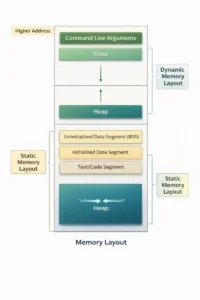
Stack memory is managed automatically by the compiler. Heap memory is YOUR responsibility — you allocate it and you must free it. This is the core principle of C memory management.
- malloc() in C — Dynamic Memory Allocation for a Single Block
malloc() is the most commonly used function for dynamic memory allocation in C. It stands for memory allocation and allocates a single block of memory of the size you specify, returning a pointer to the beginning of that block.
Syntax
ptr = (datatype*) malloc(size_in_bytes);
Example: Dynamic Memory Allocation in C using malloc()
#include <stdio.h>
#include <stdlib.h>
int main() {
    int *ptr;
    int n = 5, i;
    // Dynamic memory allocation in C for 5 integers
    ptr = (int*) malloc(n * sizeof(int));
    // Always check if allocation succeeded
    if (ptr == NULL) {
        printf("Memory allocation failed!\n");
        return 1;
    }
    // Assign values
    for (i = 0; i < n; i++) {
        ptr[i] = (i + 1) * 10;  // 10, 20, 30, 40, 50
    }
    // Print values
    printf("Values: ");
    for (i = 0; i < n; i++) {
        printf("%d ", ptr[i]);
    }
    // Free the memory
    free(ptr);
    ptr = NULL;  // Good practice
    return 0;
}
Output:
Values: 10 20 30 40 50
[Image: screenshot of malloc output. Alt text: “malloc dynamic memory allocation in C output example”]
Important points about malloc() in C:
- Returns a void* pointer — you must typecast it to the appropriate data type
- The allocated memory contains garbage values (random data) — it is NOT initialized to zero
- Returns NULL if dynamic memory allocation fails — always check for this before using the pointer
- Use sizeof() instead of hardcoding byte sizes for portability across systems
- calloc() in C — Dynamic Memory Allocation with Zero Initialization
calloc() is another key function for dynamic memory allocation in C. It stands for contiguous allocation and works like malloc() but with one important difference: it initializes all allocated memory to zero.
Syntax
ptr = (datatype*) calloc(n, size_of_each_element);
Example: Dynamic Memory Allocation in C using calloc()
#include <stdio.h>
#include <stdlib.h>
int main() {
int *ptr;
int n = 5, i;
// Dynamic memory allocation in C using calloc — initializes to 0
ptr = (int*) calloc(n, sizeof(int));
if (ptr == NULL) {
printf("Memory allocation failed!\n");
return 1;
}
printf("Initial values (all zero after calloc): ");
for (i = 0; i < n; i++) {
printf("%d ", ptr[i]);  // All zeros guaranteed
}
free(ptr);
ptr = NULL;
return 0;
}
Output:
Initial values (all zero after calloc): 0 0 0 0 0
malloc() vs calloc() — Dynamic Memory Allocation in C Comparison
| Feature | malloc() | calloc() |
|---|---|---|
| Number of arguments | 1 | 2 |
| Initializes memory | No (garbage values) | Yes (zeros) |
| Speed | Slightly faster | Slightly slower |
| Use when | You’ll fill the memory yourself | You need zero-initialized data |
- realloc() in C — Resize Dynamic Memory Allocation
realloc() is used to resize a block of memory that was previously created through dynamic memory allocation in C. It stands for reallocation and is helpful when your program needs more (or less) memory than originally allocated.
Syntax
ptr = (datatype*) realloc(ptr, new_size_in_bytes);
Example: Expanding Dynamic Memory Allocation in C using realloc()
#include <stdio.h>
#include <stdlib.h>
int main() {
int *ptr;
int i;
// Initial dynamic memory allocation in C for 5 integers
ptr = (int*) malloc(5 * sizeof(int));
if (ptr == NULL) { return 1; }
for (i = 0; i < 5; i++) ptr[i] = i + 1;
// Expand dynamic memory allocation to hold 10 integers
ptr = (int*) realloc(ptr, 10 * sizeof(int));
if (ptr == NULL) {
printf("Reallocation failed!\n");
return 1;
}
// Fill new slots
for (i = 5; i < 10; i++) ptr[i] = i + 1;
printf("Values after realloc: ");
for (i = 0; i < 10; i++) printf("%d ", ptr[i]);
free(ptr);
ptr = NULL;
return 0;
}
Output:
Values after realloc: 1 2 3 4 5 6 7 8 9 10
How realloc() works in dynamic memory allocation in C:
- If enough space is available after the current block → it expands in place
- If not → it allocates a new block, copies existing data, frees the old block, returns the new pointer
- Returns NULL on failure — always use a temporary pointer to avoid losing your data:
// Safe realloc pattern for dynamic memory allocation in C
int *temp = (int*) realloc(ptr, new_size);
if (temp == NULL) {
free(ptr);  // ptr is still valid here
return 1;
}
ptr = temp; // Only reassign if reallocation succeeded- free() in C — Releasing Dynamic Memory Allocation
free() releases memory that was obtained through dynamic memory allocation in C, returning it to the heap so the operating system can reuse it.
Syntax
free(ptr);
Rules for free() in dynamic memory allocation in C:
- Always free memory you allocate — forgetting causes a memory leak
- Never free the same memory twice — causes undefined behavior and crash
- Set pointer to NULL after freeing — prevents dangling pointer errors
- Never free stack memory — only use free() on heap memory from malloc/calloc/realloc
free(ptr);
ptr = NULL; // Always do this after freeing dynamic memory in C
Common Mistakes in Dynamic Memory Allocation in C
These errors appear frequently in BCA/MCA university exams and C programming interviews:
Mistake 1: Not Checking NULL After Dynamic Memory Allocation in C
// Wrong — never do this
ptr = (int*) malloc(100 * sizeof(int));
ptr[0] = 5;  // Program crashes if malloc failed!
// Correct
ptr = (int*) malloc(100 * sizeof(int));
if (ptr == NULL) {
printf("Dynamic memory allocation failed\n");
return 1;
}
Mistake 2: Memory Leak — Forgetting to Call free()
void example() {
int *ptr = (int*) malloc(100 * sizeof(int));
// ... do some work ...
return;  // Memory never freed — this is a memory leak!
}
// Correct: always free dynamic memory before returning
void example() {
int *ptr = (int*) malloc(100 * sizeof(int));
if (ptr == NULL) return;
// ... do some work ...
free(ptr);
ptr = NULL;
}
Mistake 3: Dangling Pointer After Dynamic Memory Allocation in C
int *ptr = (int*) malloc(sizeof(int));
*ptr = 42;
free(ptr);
printf("%d", *ptr);  // Undefined behaviour! ptr is now a dangling pointer
Mistake 4: Double Free
free(ptr);
free(ptr);  // Crash! Never call free() twice on the same pointer
Practical Example of Dynamic Memory Allocation in C — Student Marks Program
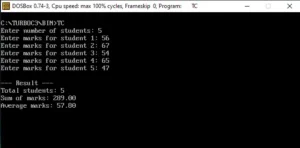
Here is a complete working program using dynamic memory allocation in C that BCA and MCA students can directly use and modify:
#include <stdio.h>
#include <stdlib.h>
int main() {
int n, i;
float *marks, sum = 0, avg;
printf("Enter number of students: ");
scanf("%d", &n);
// Dynamic memory allocation in C based on actual user input
marks = (float*) malloc(n * sizeof(float));
if (marks == NULL) {
printf("Dynamic memory allocation failed!\n");
return 1;
}
for (i = 0; i < n; i++) {
printf("Enter marks for student %d: ", i + 1);
scanf("%f", &marks[i]);
sum += marks[i];
}
avg = sum / n;
printf("\n--- Result ---\n");
printf("Total students: %d\n", n);
printf("Sum of marks: %.2f\n", sum);
printf("Average marks: %.2f\n", avg);
// Always free dynamically allocated memory when done
free(marks);
marks = NULL;
return 0;
}
This program works for any number of students because of dynamic memory allocation in C — the array size adjusts at runtime based on what the user actually needs.
Dynamic Memory Allocation in C — Summary Table
| Function | Syntax | Initializes Memory | Use Case |
|---|---|---|---|
| malloc() | malloc(size) | No (garbage values) | Allocate a block, fill manually |
| calloc() | calloc(n, size) | Yes (zeros) | Allocate zero-initialized block |
| realloc() | realloc(ptr, new_size) | Preserves old data | Resize existing allocation |
| free() | free(ptr) | N/A | Release heap memory back to OS |
Dynamic arrays
There are some aspects where C can’t boast of that it is a strong language. The two weak points of C language are:
- Floating-point numbers cannot be represented accurately and precisely, and there may be round-off and other errors whenever we deal with floating-point numbers in C language. The following programs tell the true story
#include<stdio.h>
#include<alloc.h>
main ( )
{
float  x=1.1;
if(x==1.1)
printf(“C is good in representing floating-point numbers…”);
else
printf(“C is poor in representing floating-point number…”);
}
Output: C is poor in representing floating-point numbers…
#include<stdio.h>
#include<alloc.h>
main()
{
float  f1 = 1000000456,   f2= 1000000123,  f3;
f3   =   f1  -  f2;
printf(“&f\n”,f3);
}
Output : 320
Both of the above programs give unexpected results when executed. This is the weakness of C’s representation of floating-point numbers.
- The memory to the arrays built in C is not allocated dynamically (i.e. at run time). That’s
why we have to give the dimensions of C arrays at the time of coding, and not when the program runs. Further, there is no bound-checking on array, and to add more, we have to start array subscript from 0 whereas most of the mathematical and scientific applications start the subscript from 1.
That’s why C’s support for scientific programming is not that strong. We will discuss here how memory can be allocated dynamically to the arrays in C language, and how array subscription can be changed to 1 instead of 0. This way, we can give the dimensions of the array at run time, and can handle mathematical and scientific calculations with more convenience.
Problem in passing multi dimensional arrays to a function
When we deal with 1-D arrays in C, it is clear that when a function receives a 1-D array as a parameter, as in
func(int a[])                                /*called function*/
{
….
}
main()                               /*caller function*/
{
int a[] = (1,2,3,4,5);
…
f(a);          /* a is a pointer to the beginning of the array*/
…
}
then there is no need to specify the size of the array. This is so because the function func isn’t allocating the array and does not need to know how big it is . The array is actually allocated in the caller function. The caller function sends only a pointer to the beginning
of the array is passed to the called function like func. If in the function func, we need to know the number of elements in the 1-D array, we have to pass a second parameter, as show below :
func(int a[], int n)
{
…
}
We can also write the function func as,
func(int *a, int n)
{
…
}
to show that what we are passing in really a pointer.
Thus, in the case of a 1-D array, it’s plus point of C that we do not need to specify the size of the 1-D array. Therefore, if the function func is used to do something generic like “find the largest element in the array,” then we can use the function func to call it with arrays of any size. Following example proves this point :
func(int *a, int n)
{
int I, big;
for (i =o; I <n; i++)
{
if (i ==1) big = a [i]:
if (a[i] >big) big =a [i];
}
return big;
}
void main()
{
int a [] = (1,2,3,4,5,6);
int  b[] = (7,8,9);
int  c[] = 12,34,32,21};
print f (“ Largest element of array a=%d”, func(a, 6));
/* func () called with size 6 */
print f (“ Largest elemnt of array b=%d”, func (b,3 ));
/*func () called with size 3 * /
printf (“ Largest element of array c=%d”’ func (c,4));
/ * func () called with size 4 */
}
If instead of the above function, we had to write another like
func1 (int a[6])       /* 1-D array with dimension specified */
{
…..
}
then, it would be a ridicule because func1() could only operate on arrays of size 6 (and not of size 10, or any other size!); In this case , we’d have to write several different versions of func1(), one size for each size.
But, with 2-D arrays and multi-dimensional arrays, the situation is not that straightforward. For example, suppose we want an array
int arr[5][10];
to be passed to a function max(), then how will max() receive this array ?One way is to declare max() as
max(int arr[5][10])
{
…..
}
but that is not a good solution, as dimensions of the array are fixed at compile time and the above function will work only for 2-D arrays of 5 rows and 10 columns. We can argue that if a 1-D array can be passed to a function by declaring it like
f(int *arr)
{
….
}
but this is incorrect.
The reason is that the array arr that we’re trying to pass to max is not really a multi dimensional array. Rather, it is an “array of arrays”, or a 1-D array of 1-D arrays). Therefore, what max() receives is a pointer to the first element of the array, but the first element of the array it itself an array! Therefore, max() receives a pointer to an array, So, its actual declaration should look like this:
max(int (*arr) [10])
{
…
}
The compiler will take is as if we had written arr[5][10] or arr[][10] . int (*arr)[10] says that the parameter arr is a pointer to an array of 10 ints. Still now, we can use normal array subscripts. For example, still now arr[i][j] is the jth element in the i th array pointed to by arr. The problem here is that we still have to specify the second dimension. That is, we cannot write like
max(int arr [] [] ) {—}
or,
max(int(*arr) []) {—}
Dynamic Arrays
Dynamic arrays are not actually arrays in the true sense because of the way pointers and arrays work in C. Rather they are pointers to pointers, which are being treated as arrays by using the subscript notation[].
Example:
#include<stdio.h>
typedef double ** matrix;
typedef double * vector;
typedef double elem;
vector alloc_1d(int n)
{
vector vec=malloc(n *sizeof(elem));
return vec;
}
matrix alloc_2d(int m, int n)
{
int i;
matrix mat;
mat=malloc(m*sizeof(vector));
for(i=0;i<m;i++)
mat[i]=mallic(n*sizeof(elem));
return mat;
}
To free 1-d array
void free_1d(vector vec)
{
free(vec)
}
To free 2-d array
void free_2d(matrix mat, int m)
{
int i;
for(i=0;i<m;i++)
{
free(mat[i]);
free(mat);
}
Dynamic Data Structures
Dynamic data structures are the structures that allow insertion, deletion, modification etc. of data dynamically i.e. at run time. Dynamic data structures can be linked lists, linked stacks and queues, binary tree etc.
Define a node as
typedef struct node
{
type info;
struct node *node;
}Node;
where type is any valid data type and the list would be grown dynamically.
newNode=(Node *) malloc(sizeof(Node));
This will allocate memory for a new node.
To deallocate free() function is used.
free(newNode);
Linked Stack
Stack is an Abstract data type. An ADT is a data structure together with operations performed on it. Stack is a data structure on which data can be inserted and deleted from the same end. That end is called top of the stack.The operation of inserting elements to the stack is called push and deleting is called pop. The data element pushed last in popped first. This stacks works on Last in First Out (LIFO) structure.
Typical operations performed on stack are-
Push – To insert items on the stack
Pop – The delete an item from the stack
Top – To get the item which is at the top of the stack
empty – To test whether stack is empty
full – To test whether the stack is full
Quick Revision Notes — Dynamic Memory Allocation in C for Exams
- Dynamic memory allocation in C happens at runtime; static allocation happens at compile time
- All four functions (malloc, calloc, realloc, free) are declared in <stdlib.h>
- malloc() → uninitialized memory; calloc() → zero-initialized memory
- realloc() can expand or shrink a previously allocated block; may return a new pointer
- Always check for NULL return after any dynamic memory allocation in C
- Always call free() when done; set the pointer to NULL afterwards
- Memory leak = forgetting to call free(); Dangling pointer = using memory after free()
- Double free = calling free() twice on the same pointer — always causes a crash
Dynamic Memory Allocation in C Language allows us to effectively do memory management during run time.
To learn C language step by step , you may join C language training course in Joginder Nagar
About the Author
Sanjiv Kumar is a Computer Teacher based in Himachal Pradesh with 22+ years of experience teaching C programming to BCA and MCA students. This blog covers programming and digital skills topics tailored for students of HP University and affiliated colleges.
Have a question about dynamic memory allocation in C? Drop it in the comments below.
Please like and share the topic.
Similar Topics:
File Handling in C Language File, Stream and Standard I/O Preprocessor Directives in C
You May Also Like:
Let us Learn JavaScript from Step By Step Multiple GST and Interstate Sales invoice What is New in HTML5
Frequently Asked Questions on Dynamic Memory Allocation in C
Dynamic memory allocation in C is the process of allocating memory at runtime using functions like malloc(), calloc(), and realloc() from the <stdlib.h> library. Unlike static allocation, the size is not fixed at compile time.
Both are used for dynamic memory allocation in C, but malloc() leaves allocated memory uninitialized (garbage values), while calloc() initializes every byte to zero. calloc() also takes two arguments (number of elements and element size), while malloc() takes one (total bytes).
The heap memory remains occupied until the program ends. In long-running programs, this causes a memory leak — memory usage keeps growing until the program crashes or the system runs out of RAM.
Yes. Calling free(NULL) is completely safe and has no effect. Setting a pointer to NULL after freeing it means any accidental second call to free() becomes harmless.
Dynamic memory allocation in C uses the heap — a large memory region managed manually by the programmer, separate from the stack which handles local variables automatically.
Pingback: TallyPrime Installation and Download