
Introduction
Table of Contents
(Updated for Tally Prime 2026)
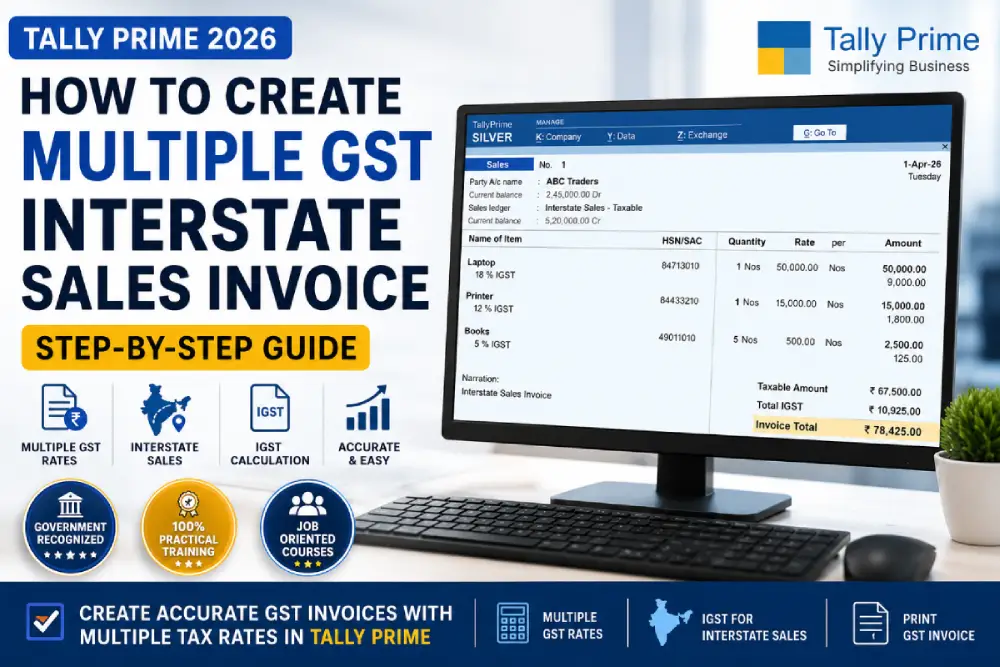
Businesses often sell products having different GST slabs within a single invoice. In Tally Prime, you can create interstate sales invoices with multiple GST rates using item-wise GST configuration. When the buyer belongs to another state, Tally automatically applies IGST according to the GST slab assigned to each stock item.
Creating an interstate sales invoice in Tally Prime becomes slightly more complex when multiple GST rates are involved in the same invoice. Many businesses sell products that fall under different GST slabs such as 5%, 12%, 18%, or 28%. In such cases, Tally Prime automatically calculates IGST according to the GST rate assigned to each item.
For example, if a business in Himachal Pradesh sells a laptop, printer, and books to a customer in Punjab, IGST will apply because the sale is interstate. At the same time, each item may have a different GST percentage.
In this guide, you will learn:
- What interstate sales mean under GST
- How IGST works in Tally Prime
- How to create multiple GST rate invoices
- Step-by-step interstate sales entry
- Common mistakes to avoid
- How to print GST invoices correctly
As per GST mandate, printing of a valid sales invoice/ GST tax invoice should have party’s GST registration, location, item details (HSN or SAC), and tax rates. Sales Invoice can be Single GST rate or multiple GST Rate invoice. In multiple GST Tax invoice you can include items having more than one GST Tax slab in a single invoice. The main benefit of multiple GST invoice is to reducing the no. of Sales invoices.
If you are new to GST billing, you should first understand the complete GST invoice format in Tally Prime before creating interstate invoices
What is Interstate Sales Under GST?
Interstate sales occur when goods or services are sold from one state to another state in India. In such transactions, IGST (Integrated Goods and Services Tax) is charged instead of CGST and SGST.
For example:
- Seller State: Himachal Pradesh
- Buyer State: Punjab
Since both states are different, IGST will apply.
Under GST law, interstate transactions are monitored through the GSTIN and state-wise tax structure.
Difference Between Interstate and Intrastate Sales
Basis | Interstate Sales | Intrastate Sales |
|---|---|---|
Seller and Buyer State | Different States | Same State |
Tax Applied | IGST | CGST + SGST |
Example | Himachal to Punjab | Himachal to Himachal |
GST Type | Integrated GST | Central + State GST |
Understanding this difference is important because incorrect tax selection can create GST return filing errors.
Requirements Before Creating Interstate Sales Invoice in Tally Prime
Before creating an interstate invoice with multiple GST rates, make sure the following setup is complete in Tally Prime.
Enable GST in Tally Prime
Go to:
Gateway of Tally → F11 Features → Statutory & Taxation
Enable:
- GST
- Set/Alter GST Details
Create Party Ledger with Correct State
The customer ledger must contain:
- Correct State Name
- GSTIN Number
- Registration Type
Example:
Field | Value |
|---|---|
State | Punjab |
GSTIN | 03XXXXXXXXXX1Z5 |
If the party state is incorrect, Tally may apply CGST and SGST instead of IGST.
To implement multiple GST rates in a single sales voucher, Items wise GST is needs to be enabled. To do this –
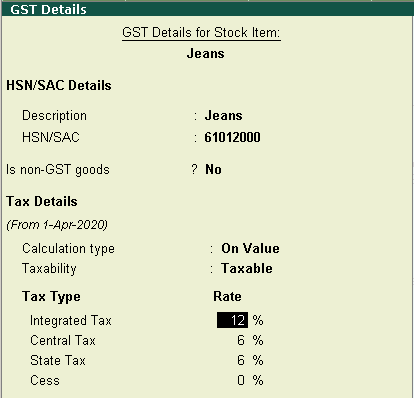
- Go to Gateway of Tally > Inventory Info > Select Stock Items > Click on Alter > under Statutory Information -Change GST Applicable to Yes, then set/alter GST Details to Yes , add description , the use HSN/SAC code – as per actual goods/commodity.
- Under Tax Details – select calculations type as on value and Taxability as Taxable
- Set Integrated Tax Rate as applicable. and to accept press Y.
Create Stock Items with GST Rates
Each stock item should contain its own GST percentage.
Example:
Item Name | GST Rate |
|---|---|
Laptop | 18% |
Printer | 12% |
Books | 5% |
This allows Tally Prime to calculate GST automatically according to each product slab.
To calculate item-wise IGST correctly, you must properly update GST for stock items in Tally before creating the sales invoice.
Create Interstate Sales Ledger
Create a sales ledger specifically for interstate sales.
Businesses dealing with interstate sales should also understand how to record purchase under GST in Tally for proper input tax credit management.
Go to:
Accounts Info → Ledgers → Create
Set:
- Under: Sales Accounts
- Type of Supply: Goods
- GST Applicable: Applicable
Tally automatically applies IGST when the buyer belongs to another state.
How to Create Multiple GST Interstate Sales Invoice in Tally Prime
Open Sales Voucher
Go to:
Gateway of Tally → Vouchers → Press F8 for Sales
Select Interstate Party Ledger
Choose the customer ledger belonging to another state.
Example:
ABC Traders – Punjab
Once selected, Tally identifies the transaction as interstate.
Select Sales Ledger
Choose the interstate sales ledger created earlier.
Example:
Interstate Sales – Taxable
Enter Stock Items with Different GST Rates
Now select multiple products.
If you are unfamiliar with voucher accounting, learning proper sales voucher entry in Tally Prime can help avoid GST calculation mistakes.
Example:
Item | Quantity | Rate | GST |
|---|---|---|---|
Laptop | 1 | 50000 | 18% |
Printer | 1 | 15000 | 12% |
Books | 5 | 500 | 5% |
Tally Prime automatically calculates IGST separately for each GST slab.
Step 5 – Verify IGST Calculation
After entering all stock items in the sales voucher, Tally Prime automatically calculates IGST based on the GST rate assigned to each item and the buyer’s state.
To verify the tax calculation:
- Press Alt + A to open the Tax Analysis screen.
- Press Alt + F1 for Detailed View.
Here you can check:
- Taxable value of each item
- Applicable GST rate
- IGST amount
- HSN/SAC details
- Total invoice tax calculation
Example:
Item | GST Rate | IGST Amount |
|---|---|---|
Laptop | 18% | ₹9,000 |
Printer | 12% | ₹1,800 |
Books | 5% | ₹125 |
If the customer belongs to another state, only IGST should appear in the voucher. CGST and SGST should not be displayed.
Before saving the invoice, always verify:
- Buyer state is correct
- GSTIN number is valid
- Tax rates are applied properly
- IGST amount matches the taxable value
Incorrect GST calculation can create problems during GSTR-1 filing and invoice reconciliation. Therefore, reviewing the Tax Analysis screen before printing the invoice is considered a good accounting practice in Tally Prime.
Example of Multiple GST Rates in Same Invoice
Suppose a business sells the following items from Himachal Pradesh to Punjab.
You can also apply item-wise or bill-wise discounts in sales invoices in Tally while creating GST invoices.
Item | Amount | GST Rate | IGST |
|---|---|---|---|
Laptop | ₹50,000 | 18% | ₹9,000 |
Printer | ₹15,000 | 12% | ₹1,800 |
Books | ₹2,500 | 5% | ₹125 |
Total Invoice Value = ₹78,425
Tally Prime automatically separates the IGST calculation according to the GST rate of each stock item.
This is one of the biggest advantages of using GST-enabled stock items in Tally Prime.
How Tally Prime Calculates IGST Automatically
When all GST configurations are properly enabled, Tally Prime automatically checks:
- Seller State
- Buyer State
- GST Registration
- GST Slab of Product
If states are different, Tally applies IGST automatically.
If both states are same, Tally applies CGST and SGST.
This automation reduces manual calculation errors during GST billing.
Common Mistakes While Recording Interstate Sales
Many users face GST calculation problems because of incorrect setup.
Wrong Party State
If the customer state is incorrect, Tally may apply CGST and SGST instead of IGST.
Incorrect GST Rate in Stock Item
If GST percentage is missing in stock items, tax calculation may fail.
Always verify GST details inside stock item master.
Using Wrong Sales Ledger
Using local sales ledger for interstate sales creates tax mismatch issues.
Maintain separate ledgers for:
- Local Sales
- Interstate Sales
- Exempt Sales
Incorrect GSTIN Number
Wrong GSTIN can create issues during GST return filing and invoice validation.
Always verify customer GST details carefully.
How to Print Interstate GST Invoice in Tally Prime
After saving the voucher:
Press:
Alt + P → Print
Check the following details before printing:
- Buyer GSTIN
- Place of Supply
- HSN Code
- IGST Amount
- Invoice Number
A properly formatted GST invoice improves compliance and professionalism.
Benefits of Using Multiple GST Rates in One Invoice
Tally Prime allows businesses to manage complex invoices easily.
Major benefits include:
- Automatic IGST calculation
- Faster billing process
- Reduced tax errors
- Better GST compliance
- Accurate invoice generation
- Easy GST return filing
This is especially useful for wholesalers, retailers, and computer hardware businesses selling mixed-category products.
HSN (Harmonized System Nomenclature) –
HSN stands for Harmonized System of Nomenclature is a system followed by most of the countries worldwide to systematically classify goods for business accounting and for implementation of Taxes. This system has been developed by the World Customs Organization (WCO) and it is now considered the global standard for naming goods.
So, HSN has now become a de facto standard for trading the business items having a standardised code worldwide. This is a 6-digit uniform code can be used to classify more than 5,000 products, and are also used for classification for tax purposes.This system is followed more than 200 countries over the world and it classifies over 98% of the goods that are available in the world to trade.
India has been a member of WCO since 1971 and was following 6-digit HSN codes to classify goods for Customs and Central Excise since 1986. Now , the Customs and Central Excise has added 2 more digits later to make HSN codes for better differentiation.
GST was introduced in India in 2017, So now HSN is used in a 3-tiered system.
- Any Business having a turnover of less than Rs 1.5 crore do not need to use HSN
- Any Business having a turnover between Rs 1.5 crore to Rs 5 crore, must use 2-digit HSN codes
- Any Business having a turnover of more than Rs 5 crore must use 4-digit HSN codes
- Any Business that deals with imports and exports have to use an 8-digit HSN code
Service Accounting Code
Service Accounting Code (SAC) is a unique code assigned to the type of service rendered that is identical to the International HSN codes in many ways. SAC is a 6 digit code issued by Central Board of Indirect Tax to classify each service and to identify the applicable rate of tax on the respective services. These SACs are used during the generation of service invoices. SAC begins with 99 which differentiates SAC from HSN.
Recording a Sales invoice with multiple GST
- From Gateway of Tally > select the Accounting Vouchers >press F8 key : to select Sales voucher .
- Select the Party A/c name from the available sundry ledgers or the cash ledger.
- Choose the common sales ledger in which GST rate is not defined.
- Select the stock items you wish to make sales and which has different/multiple GST rates defined, and specify the quantities and rates for each of them.
- Now Simply select the CGST and SGST tax ledgers. GST will be automatically calculated based on the multiple GST rates defined in the respective stock items.
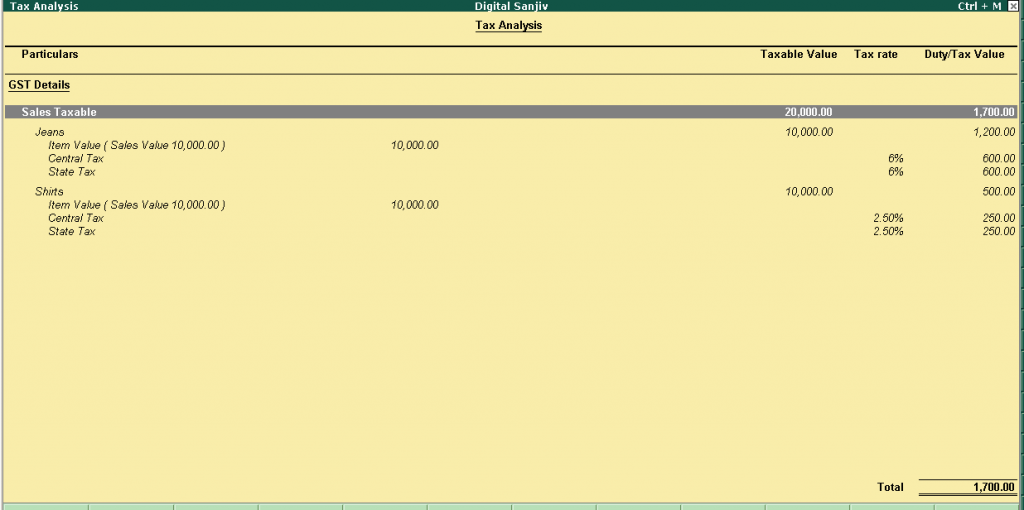
To verify this go to view the tax details by clicking Alt+A on the button menu bar on the right: Tax Analysis . Click Alt+F1 : Detailed to view the tax break-up.
- To print the sales invoice, press Alt+P .
For multiple copies :
After Pressing Alt+P then press Alt+C to select the number of invoice copies to be printed.
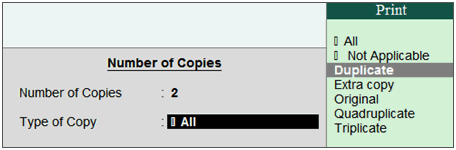
For service Invoice, original copy is printed for buyer and duplicate copy is printed for supplier.
For Sales Invoice, original copy is for buyer, duplicate is for transporter and, triplicate is for supplier .
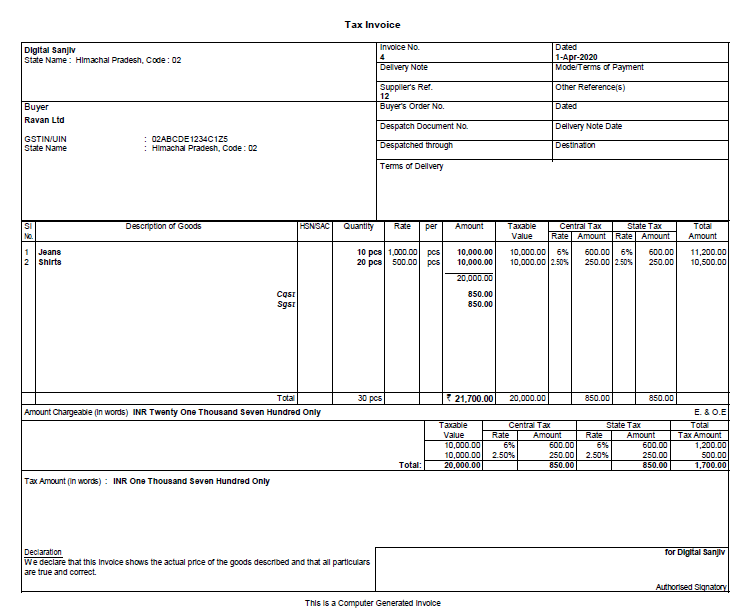
Print invoice with Item-wise GST details
According to GST guidelines, details such as the applicable taxes and tax rates, and the GSTIN/UIN of the company and the customer will be captured. So after selecting the state in the ledger master, the state name and the state code will be captured in the printed invoice.
Proper invoice formatting is important while learning how to print GST invoice in Tally Prime with tax details and HSN codes.
To print the company GSTIN on the sales invoice:
- You need to specify GSTIN under Set/alter GST details in company F11 > F3 features.
- To get the GST details printed in the sales invoices ,press F12 key in the Voucher Printing screen and configure the :
o Print Company GSTIN Number to Yes .
o Change Print Item-wise GST details to Yes , it will print the GST invoice with tax breakup for each stock item.
Interstate sales with GST
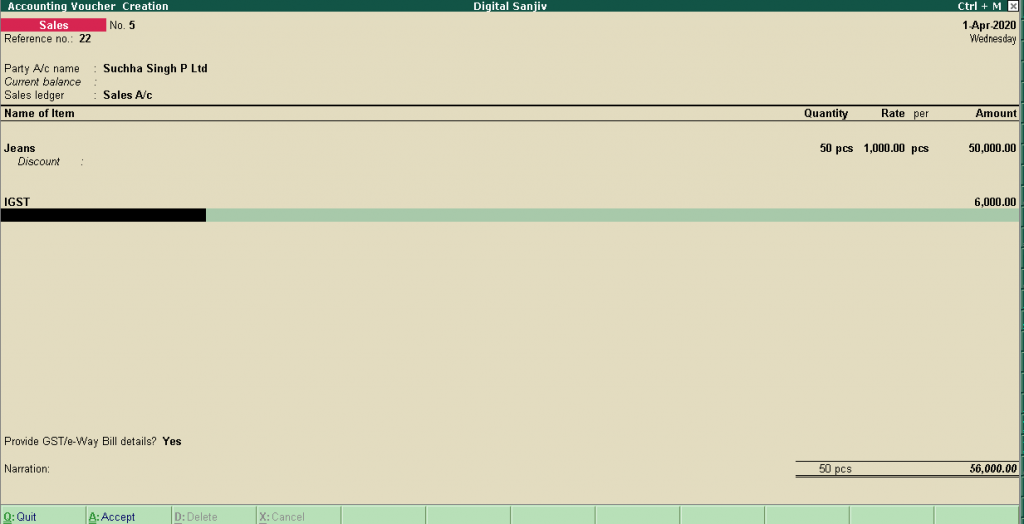
When you sell your goods to another states then the Tax jurisdiction changes. For intra-state sales CGST and SGST is levied on each sales invoices. Here CGST is a Central Tax and SGST is state Tax and kept by the state Govt. where sales has taken place.
But in case of Interstate sales two states are involved, one is originating state and other is consuming state. So the division of Taxes is done equally between centre and consuming state. Here the Tax is levied is Integrated Tax, which is divided evenly when the sales of the items happen in consuming state .
So recording the interstate sales is more or less same as Local Sales . There is just one change that instead of CGST and SGST, the integrated tax ledger is used .
B2B and B2C Invoices
Sales Invoices are categorised as Business 2 Business (B2B) and Business 2 Consumers (B2C) in the GSTR-1 Reports.
B2B covers all the Business to Business Sales under it.
B2C Invoices are further divided into B2C (Large) and B2C (Small) in GSTR-1 Reports.
B2C (Large) Invoices :All the interstate sales transactions having the invoice value is more than Rs. 2.5 lakh are shown under B2C (Large) Invoices in GSTR-1 Reports.
B2C(Small) Invoices : In GSTR-1 Reports, following transactions are captured:
- All Local sales transaction: Irrespective of the invoice value.
- Interstate sales transactions: having total invoice value less than Rs. 2.5 lakh.
Creating multiple GST interstate sales invoices in Tally Prime is simple when GST configuration is done properly. By maintaining correct party ledgers, stock item GST rates, and sales ledgers, businesses can automate IGST calculation and generate accurate invoices without manual tax adjustments.
Tally Prime not only simplifies GST billing but also helps businesses maintain proper tax compliance and reduce accounting errors.
If you regularly deal with interstate customers and products having different GST slabs, understanding this process is essential for smooth GST accounting and return filing.
This chapter was regarding the use of multiple GST Rate Sales invoices and Interstate sales. HSN and SAC has been briefly discussed here.
Yes, Tally Prime supports multiple GST slabs within a single invoice. GST is calculated separately for each item.
IGST applies when seller and buyer belong to different states.
Yes, interstate sales can be made to unregistered customers, but GST rules and invoice requirements must still be followed.
IGST applies to interstate transactions, while CGST and SGST apply to intrastate transactions.
HSN stands for Harmonized System of Nomenclature is a system followed by most of the countries worldwide to systematically classify goods (Goods are itineraries which are traded in a business ) for business accounting and for implementation of Taxes. This system has been developed by the World Customs Organization (WCO) and it is now considered the global standard for naming goods.
Service Accounting Code (SAC) is a unique code assigned to the type of service rendered that is identical to the International HSN codes in many ways. SACs is a six digit code issued by Central Board of Indirect Tax to classify each service and to identify the applicable rate of tax on the respective services. These SACs are used during the generation of service invoices. SAC begins with 99 which differentiates SAC from HSN.
In case of Interstate sales two states are involved, one is originating state and other is consuming state. So the division of Taxes is done equally between center and consuming state. Here the Tax is levied is Integrated Tax, which is divided evenly when the sales of the items happen in consuming state .
Tally calculates tax automatically based on GST configuration, stock item tax slabs, and ledger settings. You can learn more about GST configuration for stock items in Tally here.
Good
Thank you pawan
Pingback: Order Processing in Tally.ERP 9 - DigitalSanjiv
Pingback: Structures in C - DigitalSanjiv
Pingback: File Handling in C Language - DigitalSanjiv
Pingback: File, Stream and Standard I/O - DigitalSanjiv
Pingback: Top 25 Tally Prime Shortcut Keys Every Accountant Must Know