

How to File GST Return in Tally Prime
Table of Contents
Filing GST returns is one of the most important tasks for businesses and accountants in India. However, many beginners struggle with the process, especially when using Tally Prime.
The problem is not GST itself—it’s the lack of proper step-by-step understanding inside Tally.
In this detailed guide, you will learn:
• How to file GST return in Tally step by step
• How to create GST ledgers correctly
• How to enter real sales invoices
• How to generate GSTR-1 and GSTR-3B
• Common mistakes and how to avoid them
In addition, this guide includes practical examples, tables, FAQs, and expert tips to help you become job-ready.
Who Should File GST Return in Tally?
Before we begin, it is important to understand who actually needs this process.
You should learn GST filing in Tally if you are:
• A small business owner
• A shopkeeper or trader
• An accounting student
• A freelancer managing invoices
• Someone planning a career in accounting
Moreover, if you belong to areas like Joginder Nagar or nearby regions in Himachal Pradesh, learning this skill can directly improve your job opportunities in local businesses.
Documents Required Before Filing GST
Before filing GST return in Tally Prime, it is essential to keep all necessary documents ready. Without proper documentation, errors may occur during return filing, which can lead to penalties or rejection.
You should prepare the following:
- GSTIN (your registered identification number)
- Sales and purchase invoices for the period
- Bank statements for reconciliation
- HSN/SAC codes for goods and services
- Previous GST return data
Moreover, always cross-check invoice details with Tally entries. Even a small mismatch can create issues while generating GSTR-1 or GSTR-3B.
Basic Concepts You Must Know
To file GST return in Tally properly, you should understand a few core concepts.
Types of GST in India
Before filing GST returns in Tally Prime, it is important to understand the different types of GST applicable in India, as they determine how tax is calculated and reported in Tally.
Types of GST
| Type | Full Form | Applicable When | Example |
|---|---|---|---|
| CGST | Central Goods and Services Tax | Within the same state | Sale within Himachal Pradesh |
| SGST | State Goods and Services Tax | Within the same state | Sale within Himachal Pradesh |
| IGST | Integrated Goods and Services Tax | Between two different states | Himachal → Punjab |
| UTGST | Union Territory GST | Within Union Territories (without legislature) | Chandigarh, Andaman |
Explanation (Simple Understanding)
- CGST + SGST are charged together on intra-state transactions (within the same state).
- IGST is charged on inter-state transactions (between two states).
- UTGST replaces SGST in Union Territories where applicable.
👉 Therefore, selecting the correct GST type in Tally is crucial, as it directly impacts tax calculation and return filing accuracy.
What is GSTIN?
GSTIN is a unique identification number assigned to every registered taxpayer. Without GSTIN, return filing is not possible.
What is HSN/SAC Code?
HSN (for goods) and SAC (for services) help classify products and services under GST. These are mandatory for accurate tax calculation.
Enable GST in Tally Prime
First, you need to activate GST features in Tally Prime.
Go to:
Gateway of Tally → F11 (Features) → Statutory & Taxation
Then:
• Enable GST → Yes
• Enter GSTIN
• Select “Regular Dealer”
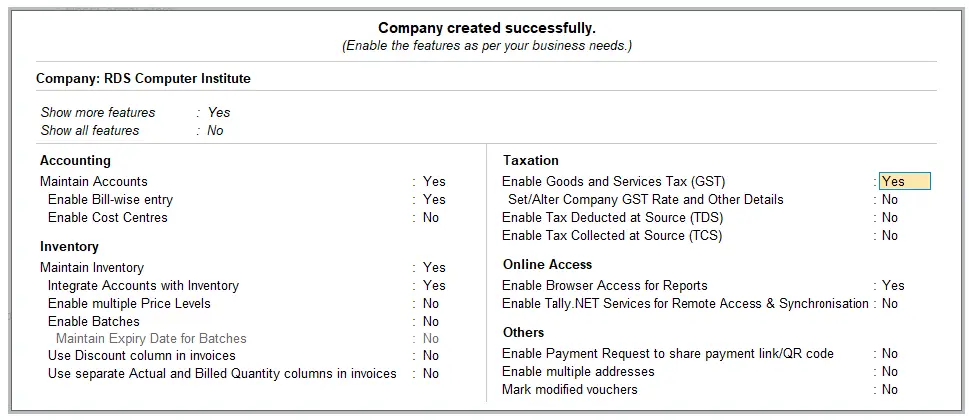 Enable GST in Tally Prime
👉 This step is critical because incorrect setup leads to wrong GST returns.
If you have not created the account ledgers in Tally Prime as yet then you should read the latest article on Account Groups in Tally Prime.
Create GST Ledgers
Next, create necessary ledgers.
Required Ledgers:
• CGST Ledger
• SGST Ledger
• IGST Ledger
• Sales Ledger
• Purchase Ledger
Important Settings:
• GST Applicable → Applicable
• Select correct tax type
👉 Without proper ledger creation, the entire GST calculation will be wrong.
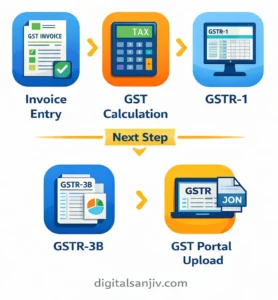
Process Flow for GST Return in Tally Prime
Enter Sales Invoice (Practical Example)
Now let’s take a real example.
Example Case Study (Real Scenario)
A shop in Joginder Nagar sells goods worth ₹50,000 within Himachal Pradesh.
Entry in Tally:
• Party Name: ABC Traders
• Sale Value: ₹50,000
• GST Rate: 18%
Calculation:
• CGST (9%) = ₹4,500
• SGST (9%) = ₹4,500
• Total Invoice = ₹59,000
👉 This is called an intra-state transaction.
On the other hand, if the sale was outside the state, IGST would apply instead.
Generate GSTR-1 in Tally
After entering all sales transactions, the next step is to generate GSTR-1 in Tally Prime. This return contains complete details of outward supplies made during the period.
To generate GSTR-1:
- Go to Display → Statutory Reports → GST → GSTR-1
- Review all sales invoices carefully
- Check GSTIN of customers
- Validate error reports
In addition, Tally allows you to export data in JSON format, which can be uploaded directly to the GST portal.
👉 Always verify data before export because incorrect entries may lead to rejection.
Generate GSTR-3B in Tally
Once GSTR-1 is prepared, you need to generate GSTR-3B, which is a summary return showing total tax liability.
Go to:
Display → Statutory Reports → GST → GSTR-3B
This report includes:
- Total outward and inward supplies
- Input tax credit (ITC)
- Net GST payable
Furthermore, ensure that ITC is correctly calculated. Many beginners make mistakes here, which directly affects tax liability.
👉 Always reconcile GSTR-3B with GSTR-1 to avoid discrepancies.
Can We File GST Return Directly from Tally?
No, GST returns cannot be filed directly from Tally Prime. The software is designed to prepare and organize GST data, but the actual filing must be done on the official GST portal.
However, Tally makes the process much easier by:
- Automatically generating GSTR-1 and GSTR-3B reports
- Providing error detection and validation tools
- Allowing export in JSON or Excel format for upload
Once the reports are ready, you need to:
- Export the return data from Tally
- Log in to the GST portal
- Upload the file and complete submission
👉 In simple terms, Tally works as a preparation and verification tool, while the GST portal is used for final filing.
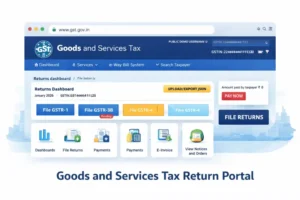
Moreover, using Tally reduces manual errors and saves time, especially when handling multiple invoices. However, you should always cross-check the data before uploading, as any mistake can lead to rejection or penalties.
Difference Between GSTR-1 and GSTR-3B
Before filing GST returns, it is important to understand the difference between GSTR-1 and GSTR-3B, as both serve distinct purposes in the GST compliance process.
| Feature | GSTR-1 | GSTR-3B |
|---|---|---|
| Purpose | Sales details | Tax summary |
| Filing Type | Detailed | Summary |
| Frequency | Monthly/Quarterly | Monthly |
GST Return Due Dates (India 2026)
Understanding GST return due dates is essential to ensure timely filing and avoid penalties or late fees under GST compliance.
| Return | Due Date |
|---|---|
| GSTR-1 | 11th of next month |
| GSTR-3B | 20th of next month |
👉 Late filing can result in penalties and interest.
Common Mistakes in GST Filing (With Impact)
| Mistake | Impact |
|---|---|
| Wrong GST rate | Incorrect tax liability |
| Missing GSTIN | Return rejection |
| Wrong ledger setup | Calculation errors |
| Ignoring validation errors | Filing issues |
| Mixing IGST & CGST/SGST | Compliance problems |
👉 Therefore, always verify before submission.
Expert Tips to Master GST in Tally
To master GST filing in Tally Prime, you must go beyond basic entries and focus on accuracy and compliance.
Follow these expert-level practices:
- Always reconcile books with GST reports before filing
- Use real business transactions instead of dummy practice
- Regularly update Tally Prime to latest version
- Learn error correction and revision process
- Understand GST portal workflow alongside Tally
👉 These skills are what actually make you job-ready, not just theoretical knowledge.
Local Advantage (Important for Students)
If you are from Joginder Nagar or nearby areas, learning practical GST filing can open doors in:
• Local CA firms
• Small businesses
• Retail shops
• Freelancing opportunities
👉 Many businesses prefer trained local candidates who already understand Tally GST.
To become fully skilled, you should also learn:
• GST basics
• Accounting fundamentals
• Tally course with practical training
• Real business case studies
👉 This creates a strong foundation for accounting careers. You should read the detailed topic about the Tally GST Salary in India with career scope to get more insight about Tally GST career opportunities.
Final Thoughts
Learning how to file GST return in Tally Prime is not just a technical skill—it is a career opportunity.
If you can:
• Create ledgers correctly
• Enter invoices accurately
• Generate returns without errors
Then you are already ahead of most beginners in India.
If you want to master GST with practical training:
• Work on real invoices
• Learn from industry experts
• Become job-ready quickly
👉 Join a Tally GST course in Joginder Nagar and start your accounting career with confidence.
📞 Book Free Demo Class on WhatsApp (Limited Seats)
Frequently Asked Questions (FAQ)
Can we file GST return directly from Tally?
No, Tally generates reports which you upload on the GST portal.
What happens if GST return is wrong?
You may face penalties and need to revise the return.
Is Tally Prime enough for GST filing?
Yes, it is widely used in India for GST compliance.
What is the penalty for late GST filing?
₹50 per day (₹25 CGST + ₹25 SGST), subject to limits.
Can beginners learn GST in Tally easily?
Yes, with practical training and real examples.
Pingback: Is Tally Enough for an Accounting Job in 2026 Salary, Skill & career
Pingback: Accounting Fundamentals for Beginners 2026 Guide with Examples
Pingback: Top 25 Tally Prime Shortcut Keys Every Accountant Must Know