
JavaScript Control Statements and Operators
Table of Contents
JavaScript Control Statements is a very crucial component in deciding the program flow control . Depending upon the JavaScript control statements the programs may split in many branches, or repeat certain steps certain number of times or may jump certain statements. JavaScript Control Statements are of three types
· Selection Statements
· iteration Statements
· Jump Statements
Selection Statements
Selection statements in JavaScript control statements decides the program flow control based on selection i.e. a condition . If a condition evaluates to true then one path is followed and if false then another. If statements and Switch Statement comes under selection statements.
JavaScript If Statements
The JavaScript if-else statement is used to execute the code for both the conditions may it be true or false. If Statements in JavaScript can take three different variations.
- If Statement
- If else statement
- if else if statement
JavaScript If statement
The Simple If Statement is evaluated for one one condition and that too only if condition is true. The syntax of JavaScript if statement is given below.
if(condition){
//content to be evaluated
}
A small example of JavaScript Control Statement using Simple if statement .
<!DOCTYPE HTML>
<HTML>
<head>
</head>
<body>
<script>
var a=20;
if(a<20){
document.write("<h1>value of a is less than 20<h1>");
}
</script>
</body>
</html>
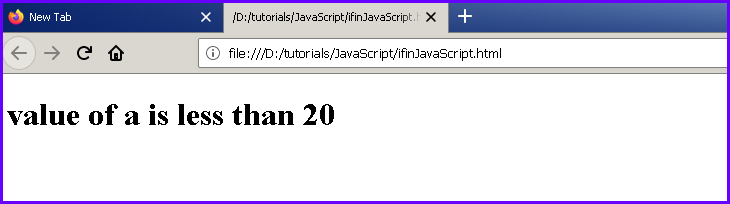
Result of above program will look like this:
JavaScript If-else Statement
The If Else statement is used when we have to choose from two conditions the condition here can be true of false.
Formal syntax of JavaScript if-else statement is given below.
if(condition){
//content to be evaluated if condition is true
}
else{
//content to be evaluated if condition is false
}
Example of If -else Statement
<!DOCTYPE HTML>
<HTML>
<head>
</head>
<body>
<script>
var a=3;
if(a%2==0){
document.write("a is divisible by two");
}
else{
document.write("a is not divisible by two");
}
</script>
</body>
</html>
JavaScript If…else if statement
When you have more than two conditions to be evaluated the if else-if is used. It executes the block only if condition is true from several conditions. The syntax of JavaScript if else if statement is given below.
if(condition1){
//content to be evaluated if condition1 is true
}
else if(condition2){
//content to be evaluated if condition2 is true
}
else if(condition3){
//content to be evaluated if condition3 is true
}
else{
//Else body will execute if none of the conditions above is true
}
An example of if else if statement in JavaScript.
<!DOCTYPE HTML>
<HTML>
<head>
</head>
<body>
<script>
var x=20;
if(x==10){
document.write("x is equal to 10");
}
else if(x==15){
document.write("x is equal to 15");
}
else if(x==20){
document.write("x is equal to 20");
}
else{
document.write("x is not equal to 10, 15 or 20");
}
</script>
</body>
</html>
JavaScript Switch
The switch statement is JavaScript Control Statement which is used to execute one code from multiple expressions. It is just like if else- if statement. But it is more convenient to understand and use than if else-if because it can be used with numbers, characters etc. Also the program code size also get shorten to great extent.
The syntax of JavaScript switch statement is given below.
switch(expression){
case value1:
code to be executed;
break;
case value2:
code to be executed;
break;
……
default:
code to be executed if above values are not matched;
}
The Program below demonstrates the use of switch statement in JavaScript.
<!DOCTYPE HTML>
<HTML>
<head>
</head>
<body>
<script>
var grade='B';
var result;
switch(grade){
case 'A':
result="A Grade";
break;
case 'B':
result="B Grade";
break;
case 'C':
result="C Grade";
break;
default:
result="No Grade";
}
document.write(result);
</script>
</body>
</html>
Note: The switch JavaScript Control Statement is fall-through statement which means that each and every case will be evaluated if break statement is not used.
JavaScript Operators
JavaScript operators are special symbols which are used to perform operations on operands. Operands are the values or variables on which certain operations are performed. For example:
var sum=20+40;
in the expression above , + is an arithmetic operator and = is the assignment operator.
Types of operators available in JavaScript.
- Arithmetic Operators
- Comparison (Relational) Operators
- Bitwise Operators
- Logical Operators
- Assignment Operators
- Special Operators
JavaScript Arithmetic Operators
Arithmetic operators carryout arithmetic operations on the operands. The below mentioned operators are known as JavaScript arithmetic operators.
| Operator | Description | Example |
| + | Addition | 10+20 = 30 |
| – | Subtraction | 20-10 = 10 |
| * | Multiplication | 10*20 = 200 |
| / | Division | 20/10 = 2 |
| % | Modulus (Remainder) | 20%10 = 0 |
| ++ | Increment | var x=20; x++; Now x = 11 |
| — | Decrement | var y=10; y–; Now y = 9 |
JavaScript Comparison Operators
The JavaScript comparison operator is used to compares the two operands. The comparison operators are as follows:
| Operator | Description | Example |
| == | Is equal to | 20==20 = True |
| === | Identical(equal and of same type) | 50==50 = True |
| != | Not equal to | 10!=20 = True |
| !== | Not Identical | 20!==20 = False |
| > | Greater than | 20>10 = True |
| >= | Greater than or equal to | 30>=50 = False |
| < | Less than | 20<10 = False |
| <= | Less than or equal to | 20<=10 = False |
JavaScript Bitwise Operators
The bitwise operators carry out bitwise operations on operands. The bitwise operators are as follows:
| Operator | Description | Example |
| & | Bitwise AND | (1010 & 1100) = 1000 |
| | | Bitwise OR | (1010 | 1100) = 1110 |
| ^ | Bitwise XOR | (1010 ^ 1100) = 0110 |
| ~ | Bitwise NOT | (~10)2 = (01)2 |
| << | Bitwise Left Shift | (1010<<2) = 101000 |
| >> | Bitwise Right Shift | (1010>>2) = 0010 |
| >>> | Bitwise Right Shift with Zero | (10>>>2) = 0010 |
JavaScript Logical Operators
The operators mentioned below are called JavaScript logical operators.
| Operator | Description | Example |
| && | Logical AND | (10==20 && 20==33) = false |
| || | Logical OR | (10==20 || 20<33) = True |
| ! | Logical Not | !(10==20) = true |
JavaScript Assignment Operators
The JavaScript assignment operators are as follows.
| Operator | Description | Example |
| = | Assignment | 10+10 = 20 |
| += | Add and assign | var a=10; a+=20; Now a = 30 |
| -= | Subtract and assign | var a=20; a-=10; Now a = 10 |
| *= | Multiply and assign | var a=10; a*=20; Now a = 200 |
| /= | Divide and assign | var a=10; a/=2; Now a = 5 |
| %= | Modulus and assign | var a=10; a%=2; Now a = 0 |
JavaScript Special Operators
The JavaScript have some special operators as listed below.
| Operator | Description |
| (?:) | Conditional Operator is similar to if-else statement, it returns value based on the condition. |
| , | Comma Operator allows multiple expressions to be included as single statement. |
| delete | Used to delete a property from the object. |
| in | Used to check if object has the given property |
| instanceof | checks if the object is an instance of given type |
| new | creates an instance (object) |
| typeof | checks the type of object. |
| void | it discards the expression’s return value. |
| yield | checks what is returned in a generator by the generator’s iterator. |
[sg_popup id=”256″ event=”inherit”][/sg_popup]
JavaScript Control Statements and Operators is a very fundamental topic, we have discussed. It gives insight about the use of operators and program control structures. Pl like share and Subscribe it.
To visit the Official website of JavaScript Click here
Similar Topics: How To Enable JavaScript in Browsers, How to Generate Output in JavaScript
What are the Control Statements in JavaScript?
1. Selection Statements – If Statements and Switch Statement
2. Iterations Statements – For, While and Do-While Loops
3. Jump Statements – Break, Continue and Return
What are the Basic Operators in JavaScript ?
Pingback: JavaScript String and Date Objects - DigitalSanjiv
Pingback: Preprocessor Directives in C - DigitalSanjiv